DoseNext
Confirm it from the Lock Screen
Get DoseNext
Coming to the App Store
What it is
DoseNext is a medication reminder and pill tracker app for iPhone and Apple Watch that merges several treatment courses into one day, reminds up to three times per dose, and keeps an adherence history you can hand to a doctor as a PDF.
Who it is for
Anyone following a schedule they should not have to remember — people on several long-term prescriptions, someone finishing a course of antibiotics, and carers keeping an eye on an older relative. The interface is built for an elderly user: large type, large buttons, one obvious action per screen.
- Running an open-ended blood pressure tablet alongside a ten-day course of antibiotics, merged into one day
- Confirming a dose from a notification, a Home Screen widget or the Lock Screen without opening the app
- Catching a dose forgotten at breakfast without it burying the one due tonight
- Knowing a packet is running low before it runs out
- Printing an adherence report to take to an appointment
What makes it different
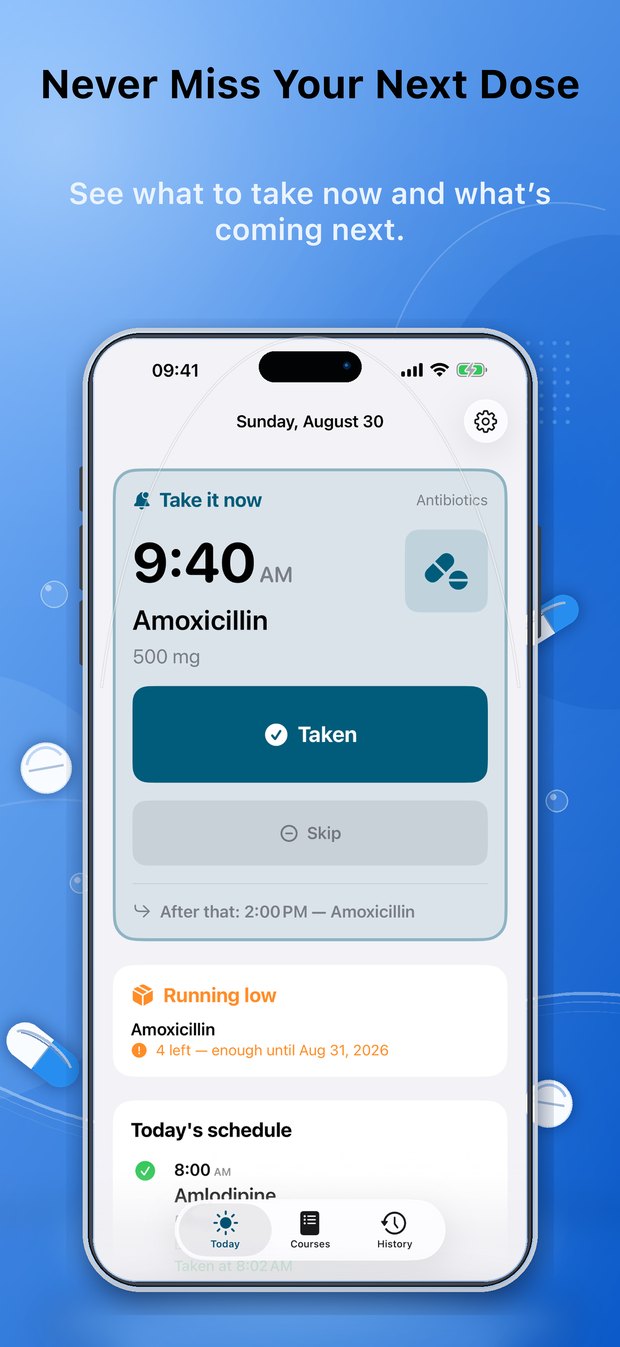
- One action at a time — the next dose fills the screen as a card with a single large Taken button, and the rest of the day sits underneath
- A missed dose is never auto-completed and never blocks the next one: after an hour it moves to a separate “Missed today” list, still visible and still actionable
- The schedule is computed from the courses rather than stored, so editing a course takes effect immediately and every record keeps a snapshot of how the dose read at the time
- A doctor’s report as a PDF that prints the time each dose was actually confirmed — 08:00 Metformin … Taken 08:03 — rather than a tick
- Nothing is hidden behind a gesture; every action is a labelled button, with Dynamic Type, VoiceOver and Reduce Motion supported throughout
- Fourteen languages including Arabic, switchable inside the app without a relaunch, right-to-left included
- No DoseNext account and no server: the schedule lives on the device, and optional sync uses your own iCloud
Pricing
- Free to download, and free to use for the whole of what it is for — the schedule, the reminders, confirming a dose, resolving a missed one and the recorded history
- Optional Premium adds iCloud sync, the adherence dashboard, refill tracking, the doctor’s report and the watch and widget extras
- Monthly, yearly and one-off lifetime options; prices are shown in the app and on the App Store in your own currency
- Billed by Apple. No account is required, and nothing already recorded is deleted if Premium lapses
Platforms & compatibility
- Runs on
- iPhone, Apple Watch
- Requires
- iOS 18.0 or later
- Languages
- English, Ukrainian, German, Spanish, French, Italian, Dutch, Polish, Portuguese (Brazil), Turkish, Arabic, Japanese, Chinese (Simplified) and Korean
- Developer
- Andrii Kolisnyk
What it does not do
- iPhone and Apple Watch only — there is no iPad-specific layout, no Android version and no web version
- It is a schedule keeper, not a medical device. It gives no medical advice and never adjusts a dose, a time or a course length on its own
- Reminders are ordinary local notifications, so Focus modes, Do Not Disturb and Low Power Mode can delay them — it is not a substitute for a critical alarm
- iOS allows only 64 pending notifications per app, so on a very busy schedule reminders more than a couple of days out are scheduled as the app is used rather than all at once
- A dose cannot yet be shared with a carer on another device; history syncs to your own iCloud only
- The Lock Screen Live Activity can only be started while the app is open or when a reminder is tapped, because starting one in the background would need a server
What
it does
One question at a time
The next dose fills the screen as a card — the time, the medication, the amount and one large Taken button. Everything else in the day sits underneath it.
Courses, not reminders
Several treatment courses run at once and merge into one day. Each repeats every day, on chosen weekdays, or every few days — and can run open-ended until you pause it.
Reminds, then stops
Up to three notifications per dose — a minute before, at the time, and once after while it is still unconfirmed. Confirm straight from the notification, a widget or the Lock Screen.
A report for the doctor
Adherence over a period you choose, per medication, and a PDF that prints the time each dose was actually confirmed rather than a tick.
See it in action
Never miss your next dose — what to take now, and what is coming next 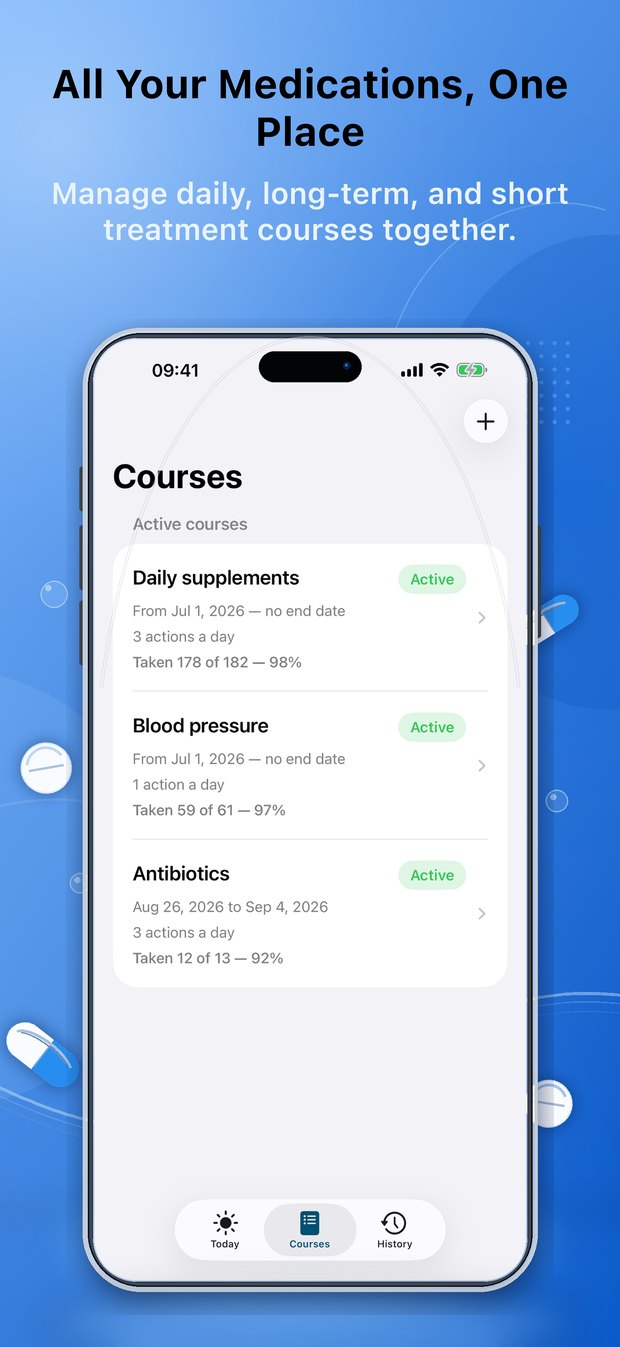
All your medications in one place — daily, long-term and short courses together 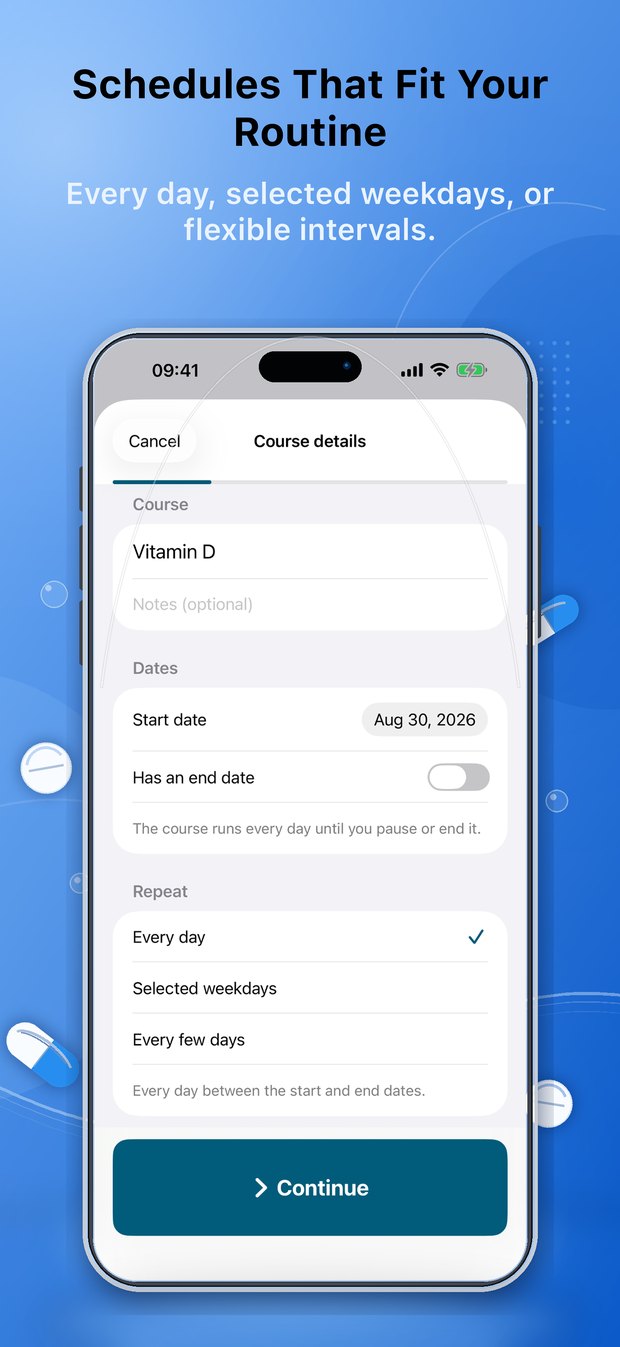
Schedules that fit your routine — every day, selected weekdays or flexible intervals 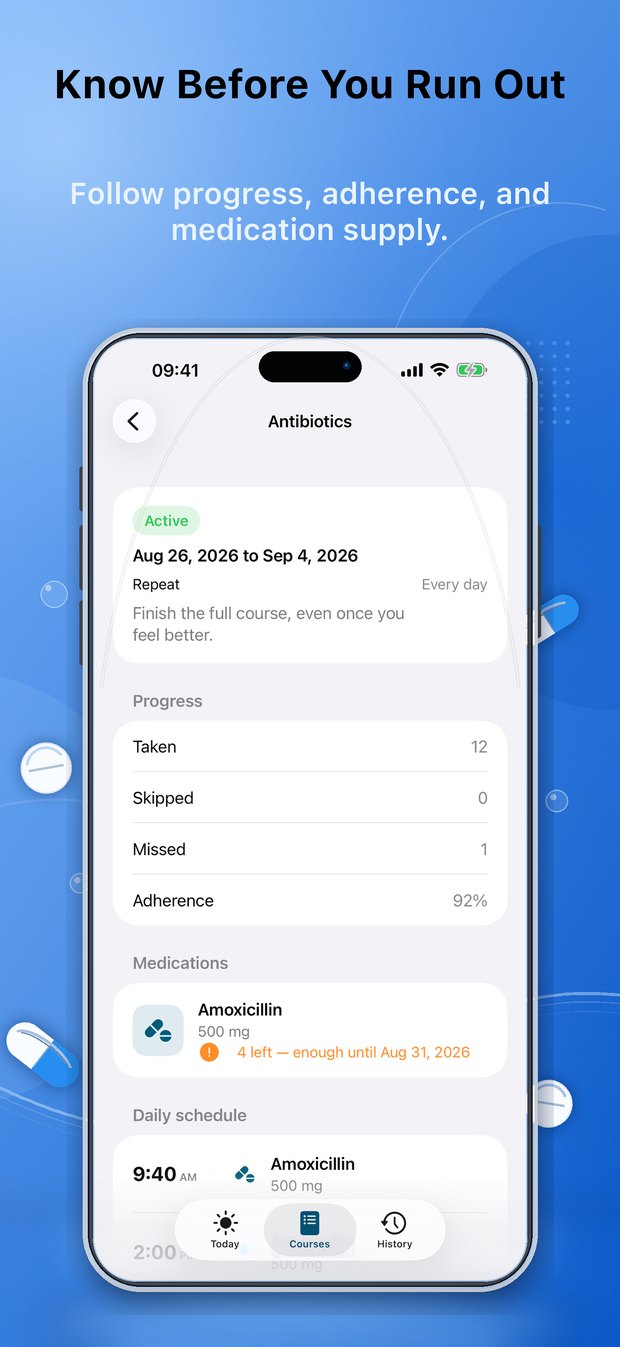
Know before you run out — progress, adherence and what is left in the packet 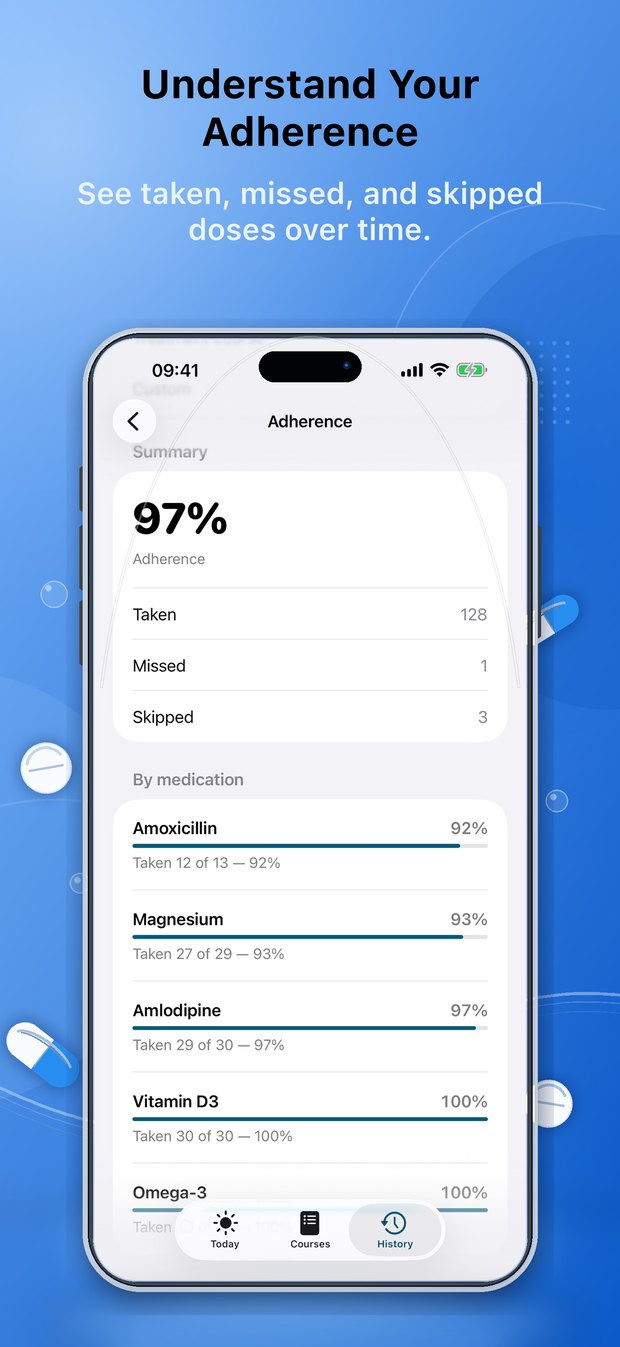
Understand your adherence — taken, missed and skipped doses over time 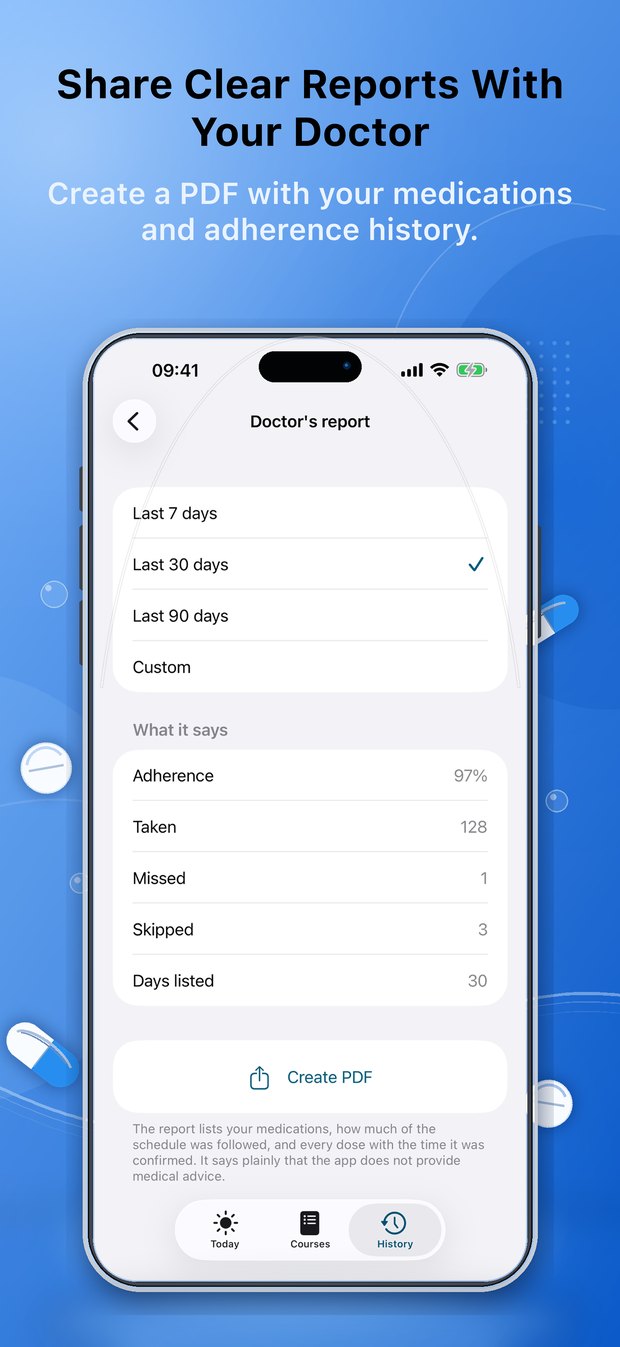
Share a clear report with your doctor — a PDF of your medications and adherence
Common questions
Is DoseNext free?
The part that matters is. The schedule, the reminders, confirming a dose, resolving a missed one and the recorded history all work without paying, and they keep working if Premium lapses. Premium adds iCloud sync, the adherence dashboard, refill tracking, the doctor’s report and the watch and widget extras — prices are shown in the app.
Can it handle more than one medication at a time?
Yes. DoseNext is built around treatment courses rather than single reminders, so an open-ended blood pressure tablet and a ten-day course of antibiotics run at once and are merged into one chronological day.
What happens if I miss a dose?
Nothing is lost. An unconfirmed dose stays the thing to do for an hour, then moves to a separate “Missed today” list — still visible and still actionable, but never in the way of the one due this evening. Missed doses are never auto-completed.
Can I confirm a dose without opening the app?
Yes — from the notification, from the Home Screen or Lock Screen widget, from the Lock Screen Live Activity, or from Apple Watch. All of them write the same record the app writes, so they cannot disagree about your history.
Does DoseNext tell me when I am running out of a medication?
If you ask it to. Counting is off unless you turn it on. When it is on, confirming a dose takes one out of the packet and DoseNext warns at a threshold you set — so many doses left, or so many days, worked out against the schedule that will actually empty the packet.
Can I give a report to my doctor?
Yes. History produces a PDF listing the medications as prescribed, how much of the schedule was followed, and every dose that came due with the time it was actually confirmed. It is a transcript rather than a measurement, and it says so on every page.
Where is my medication data stored?
On your device. There is no DoseNext account and no server of mine. If you leave sync on, it mirrors to your own private iCloud database, which only your Apple Account can read. See the privacy policy.
Does DoseNext give medical advice?
No, and it is designed not to. It helps you follow a schedule you, a carer or a healthcare professional configured, and it never adjusts a dose, a time or a course length on its own. Someone running low on a medication needs a pharmacist, not a suggestion from a phone.
Is DoseNext available on Android?
No. It is an iPhone app with an Apple Watch companion.
Get DoseNext
Coming to the App Store
 Magibook Reading & audiobooks
 TimeTill Countdown widgets
 Utility Island macOS menu bar utility
 Flunio AI language learning
 Storytelling Kids’ bedtime stories
Get DoseNext
one dose at a time!A SwiftUI medication app with a computed schedule, SwiftData history, widgets, a watch companion and a doctor’s report.