Andrii Kolisnyk
iOS Engineer
← AndriiiOS appPrivacy
Lift!

RepnioAI workout planner & gym tracker

Stop guessing. Start progressing.
A gym tracker that tells you what to lift next, plans your training with AI and shows every exercise in 3D — with food, body and an Apple Watch app in the same place.
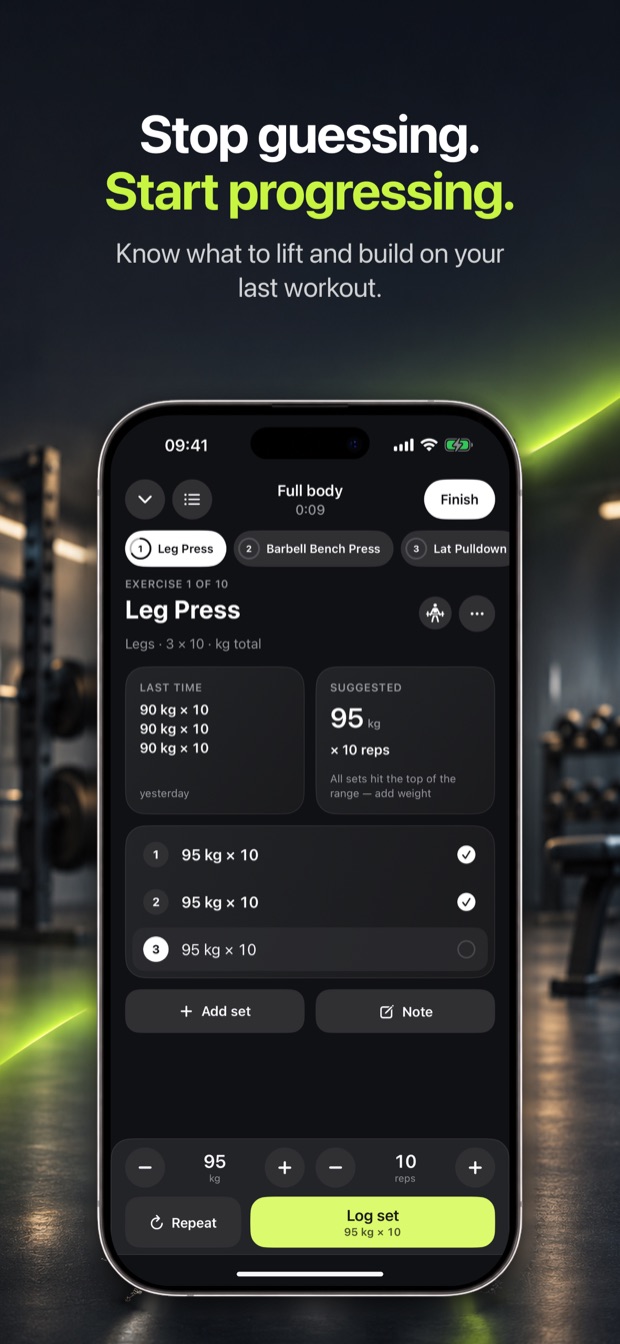
Repnio app iconRepnio App Store screenshot: a leg press set in progress with last time’s sets, a suggested 95 kg × 10, and Repeat and Log set buttons

Wrong vs correct form, in 3D

Repnio app icon

Get Repnio

Coming soon to the App Store · iPhone and Apple Watch

What it is

The short, factual version →

Repnio is a workout tracker and AI training planner for iPhone and Apple Watch that suggests the weight and reps for every set, writes and adjusts multi-week gym plans, shows each exercise’s correct and wrong form on a 3D model, and tracks food, body measurements and recovery alongside the training.

Who it is for

People who train in a gym or at home and want to keep getting stronger without planning every session themselves — from someone on their first programme to a lifter tracking every set.

  • Logging a gym session one-handed between sets, with the next weight already suggested
  • Getting a four-week plan built around your goal, schedule, split and the time you have for a workout
  • Checking how an exercise should look, and how it should not, before trying it
  • Swapping an exercise when the machine is taken, for another that works the same muscles
  • Logging a meal from a photo, a barcode or a nutrition label and seeing the calories left for today
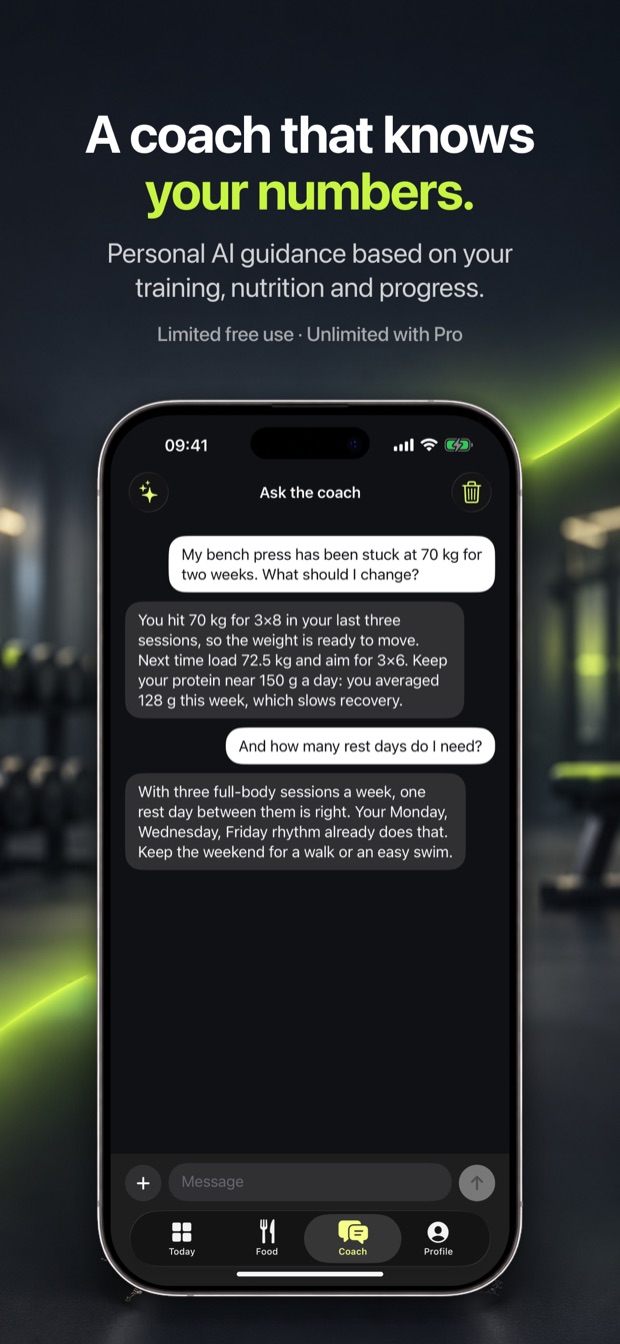
  • Asking a coach about your own numbers — why a lift has stalled, or what to eat for the rest of the day
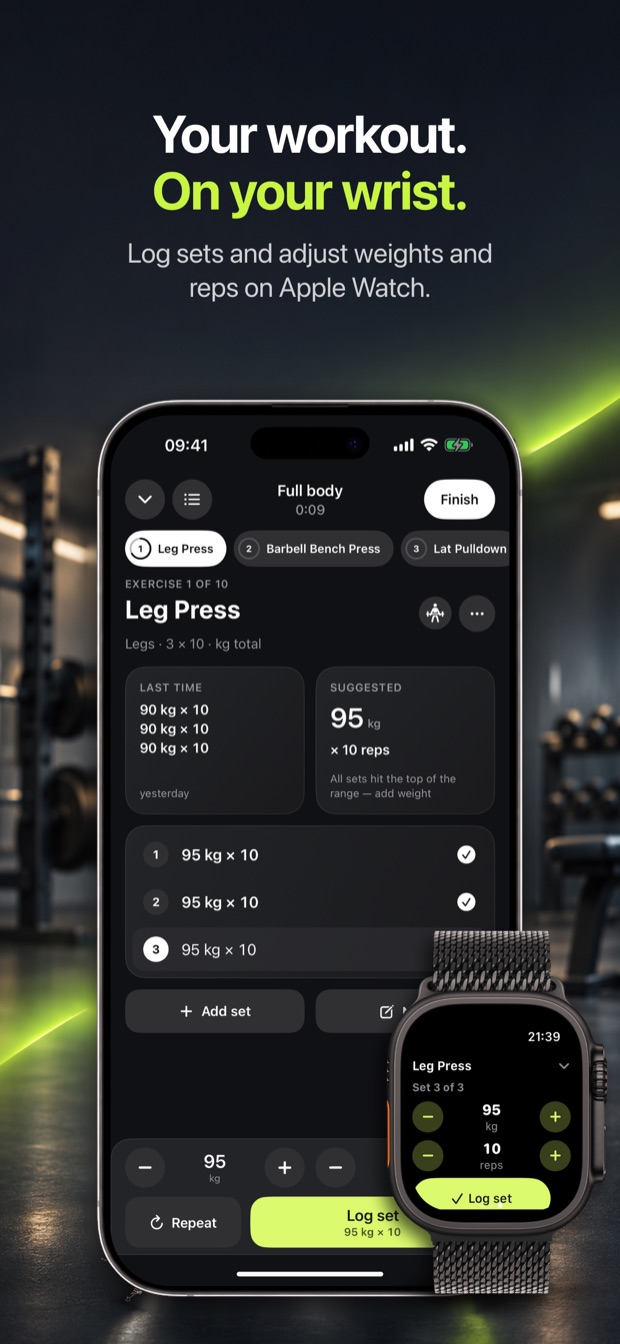
  • Starting a strength workout on the iPhone and logging sets from the Apple Watch

What makes it different

  • Double progression built in: every set comes with a suggested weight and reps from what you lifted last time, and drops back after a long break
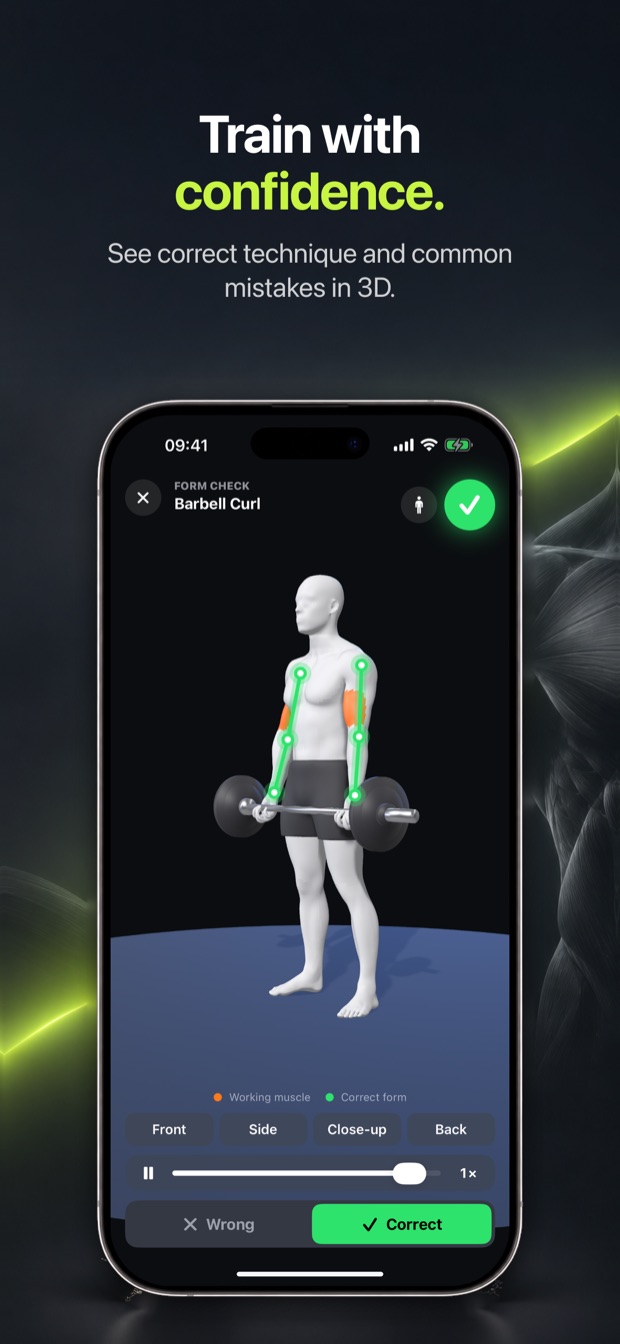
  • A 3D form check for all 78 exercises in the library — wrong and correct form, from any angle and in slow motion, with the working muscles highlighted
  • AI plans use only those 78 exercises, so every planned exercise has its technique guide and 3D model; you review and edit a plan before it replaces anything, and can undo it
  • A weekly check-in adjusts only the weeks still ahead, from what you actually lifted
  • Made for one hand in the gym: logging a set is one tap, changing the weight and logging is two
  • The coach answers from your last four weeks of training, food and body data, and can change a workout only after you confirm
  • Training, food, body, recovery and the Apple Watch in one app, in 13 languages
  • No account to create: everything you log is stored on your iPhone

Pricing

  • Free to download, with the workout log, history, exercise charts, food and drink logging, barcodes, Apple Health and the Apple Watch app free to use
  • Optional Repnio Pro: unlimited AI plans and changes, the weekly plan adjustment, unlimited coach messages and food scans, muscle volume, the recovery card and PDF reports
  • Monthly or annual subscription billed by Apple; prices and any free trial are shown in the app before you buy
  • No account required

Platforms & compatibility

Runs on
iPhone, Apple Watch
Requires
iOS 17.0 or later; watchOS 10 or later for the Apple Watch app
Languages
English, Ukrainian, German, Spanish, French, Italian, Portuguese (Brazil), Polish, Turkish, Dutch, Japanese, Korean and Chinese (Simplified)
Developer
Andrii Kolisnyk

What it does not do

  • iPhone and Apple Watch only — no iPad layout, no Android and no web version
  • The AI plan, coach and meal estimates need an internet connection; logging workouts and food by hand works offline
  • Calorie, meal and recovery figures are estimates, not medical advice; the recovery cue is not a medical reading
  • Exercise names are in English in every language
  • The free version allows one AI plan and 7 coach messages and 7 AI food scans a week
  • Data stays on the iPhone and is not synced between devices; back it up to a file yourself
  • Not on the App Store yet
  • For adults: you must be 18 or older to use it

What
it does

Knows what to lift next

Every set comes with a suggested weight and reps, from what you did last time. Log it with one tap, repeat a set with one more, and let the rest timer run on its own.

A plan that adapts

An AI plan built on your goal, schedule and split, with targets for every exercise in every week. Edit it, ask for changes in plain words, and adjust the weeks ahead after each check-in.

Form check in 3D

Each exercise performed wrong and right on a 3D body, with the working muscles lit up. Turn it, zoom in and slow it down.

Food and body, same app

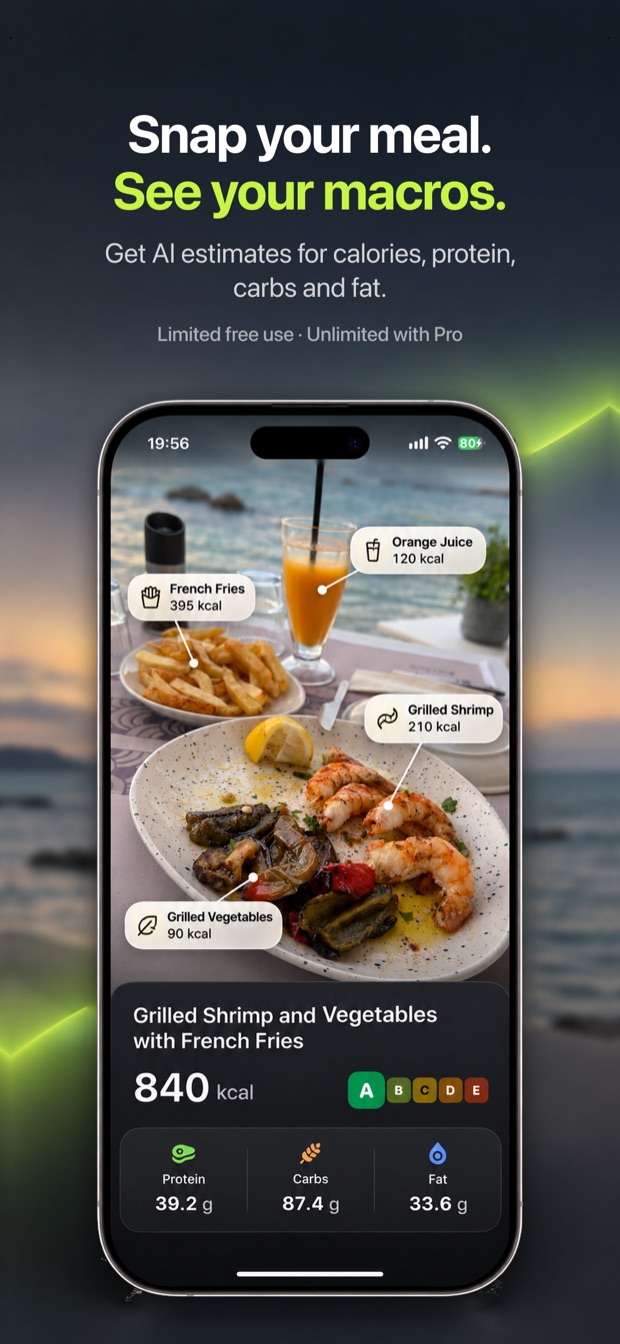
Log a meal from a photo, a barcode or a label and see the calories left today. Weight, measurements, muscle volume and recovery sit next to your training.

Straight from Repnio

Check your form. Right here.

This is the app’s own 3D model of the Barbell Curl. Switch between the common mistake and the correct form, drag sideways to turn it, and watch the working muscles light up.

Barbell Curl

3D form check · one of 78 exercises

  1. The mistake, then the fix

    Every exercise is shown twice: with its most common mistake, and with correct form.

  2. Muscles that do the work

    The working muscles glow on the body, so you know what you should feel.

  3. Every exercise in the library

    In the app all 78 exercises have their own model, with front, side, close-up and back views and slow motion.

In Repnio, the form check opens from any exercise and from the workout screen, on a man’s or a woman’s body.

See it in action

Real screenshots →
  • Repnio App Store screenshot: a leg press set in progress with last time’s sets, a suggested 95 kg × 10, and Repeat and Log set buttons
    Stop guessing — know what to lift and build on your last workout
  • Repnio 3D form check of the barbell curl, with the working muscles highlighted, camera views and Wrong and Correct buttons
    Train with confidence — correct technique and common mistakes in 3D
  • Repnio meal photo with each food labelled with its calories, and totals of 840 kcal with protein, carbs, fat and a health grade
    Snap your meal and see your macros — calories, protein, carbs and fat
  • Repnio workout on the iPhone next to an Apple Watch showing the same leg press set with weight and reps controls and a Log set button
    Your workout on your wrist — log sets and adjust weights on Apple Watch
  • Repnio coach chat answering a question about a stalled bench press using the user’s own training and protein numbers
    A coach that knows your numbers — training, nutrition and progress
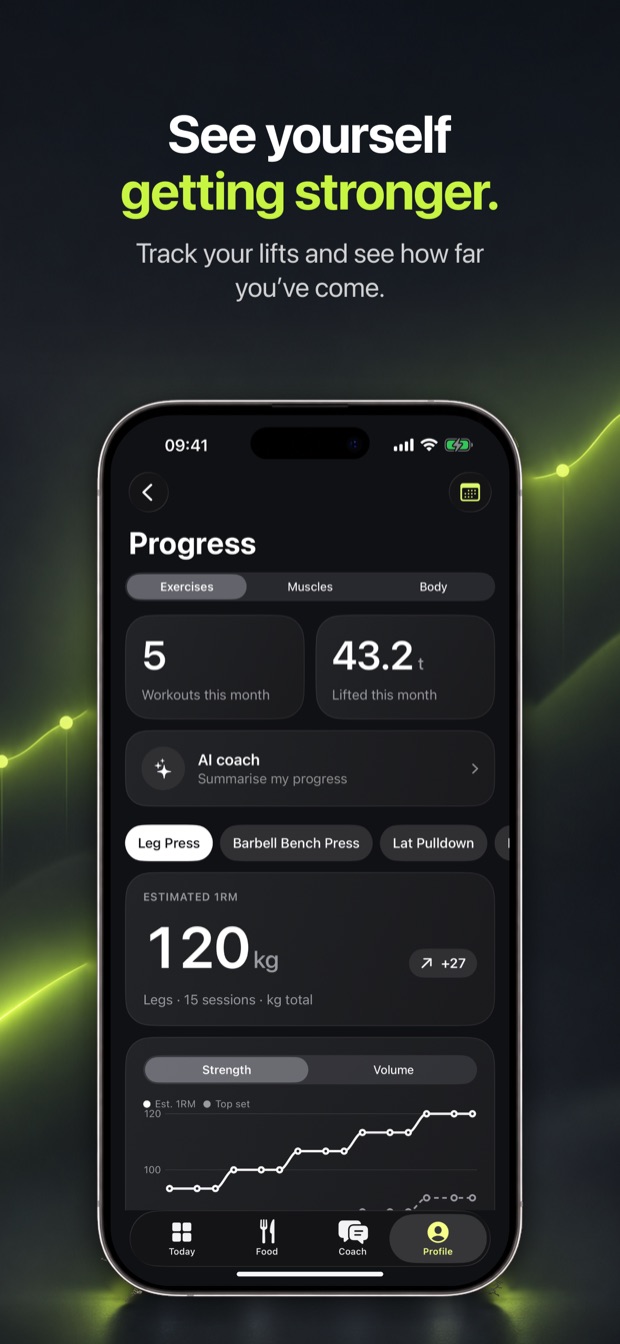
  • Repnio Progress screen with workouts and weight lifted this month and an estimated one-rep-max chart for the leg press
    See yourself getting stronger, and how far you’ve come
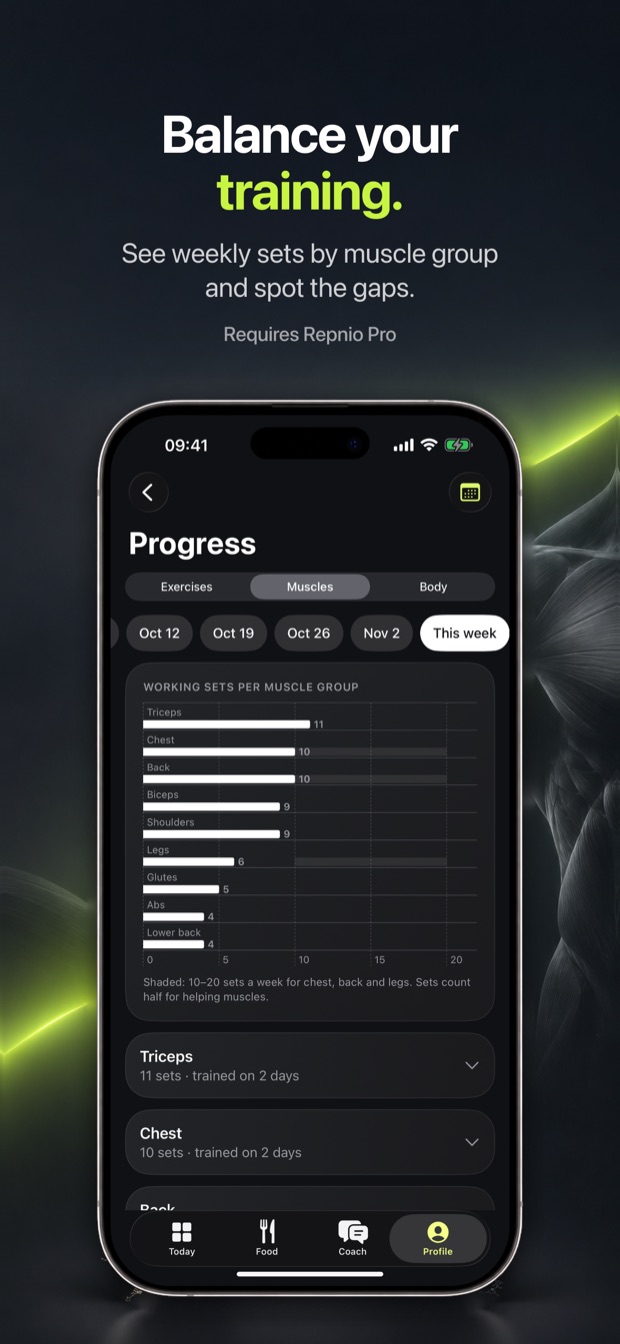
  • Repnio muscle balance chart with weekly working sets per muscle group
    Balance your training — weekly sets by muscle group, gaps included

Common questions

Is Repnio free?

The logbook is. Workouts, history, exercise charts, food and drink logging, barcodes, Apple Health and the Apple Watch app cost nothing. The free version also gets one AI plan and 7 coach messages and 7 AI food scans a week. Repnio Pro, a monthly or annual subscription, removes the limits and adds the weekly plan adjustment, muscle volume, the recovery card and PDF reports.

How does Repnio decide what weight to lift?

With double progression. You add reps until every working set reaches the top of the rep range, then the weight goes up by one step. After a long break, or when reps drop, it suggests less. During an AI plan, the session uses that week’s planned weight unless the last session was too hard.

How does the AI training plan work?

Tell it your goal, how often and how long you can train, gym or home, and any wishes — or leave them empty. It writes a plan of up to four weeks with sets, reps and weights for every exercise, built on your split. You can edit anything, ask for changes in your own words, and nothing changes until you apply it. A weekly check-in can adjust the weeks still ahead.

What is the 3D form check?

Every exercise in the library has a 3D model that performs it twice: once with the common mistake and once correctly. You can turn it, zoom in, slow it down and see the working muscles highlighted. Try the barbell curl above.

Does it track food too?

Yes. Describe a meal, photograph it, scan a barcode or point the camera at a nutrition table, and Repnio shows the calories and protein left for today. Your targets come from your goal, and can later be corrected from your weight trend once you have logged enough days.

Does Repnio work on Apple Watch?

Yes. Starting a workout on the iPhone starts it on the Watch, where you can log sets with the Digital Crown and see the rest countdown. The Watch also records runs, walks, football, swimming and more, with heart rate, and sends them to the iPhone.

Where is my data stored?

On your iPhone. There is no account. Data leaves the phone only when you use an AI feature, look up a barcode, turn on saving to Apple Health, share a backup or PDF, buy a subscription, and as anonymous usage statistics that never include names, body measurements or anything you log.

When can I download Repnio?

It is not on the App Store yet. This page describes the app as built, and the download link will appear here when it is released.

Is Repnio available on Android?

No. It is an iPhone app with an Apple Watch companion.
Repnio app icon

Get Repnio

Coming soon to the App Store · iPhone and Apple Watch

Get Repnio

coming soon!

A gym tracker that suggests every next set, an AI plan that adapts to how training actually went, and a 3D form check for every exercise.

Thank you!
Language: English